
The Importance of Structured Prompts in SitecoreAI
In the world of SitecoreAI, the quality of your output is directly tied to the precision of your input. Moving beyond simple chat interactions and toward structured prompting is the key to building reliable, enterprise-grade AI integrations. For developers, this isn’t just about “talking” to a model; it is about engineering a deterministic pipeline where AI behaves like a predictable function rather than an unpredictable chatbot.
What are Structured Prompts?
Structured prompts are organized, multi-layered instructions that guide an AI model’s logic, tone, and output format. Unlike a standard sentence-based prompt, a structured prompt breaks down the request into specific components:
- Role: Defining the persona (e.g., “You are a Sitecore SEO Specialist”).
- Context: Providing the necessary background or source data.
- Task: The specific action to be performed.
- Constraints: Rules the AI must follow.
The Power Duo: Prompting and JSON Schema
To make AI predictable enough for a CMS environment, we use JSON Constraints alongside the structured prompt. This combination ensures the AI doesn’t just “talk,” but actually functions as a data processor.
The Structured Prompt (The Behavior)
The prompt acts as the behavioral logic. It tells the AI Agent how to think, which brand guidelines to follow, and how to interpret the input. It defines the “soul” of the interaction.
JSON Schema & Constraints (The Scope)
The JSON Schema acts as the structural boundary. By enforcing a specific schema, you ensure the AI’s response is:
- Machine-readable: The output can be automatically mapped to Sitecore fields.
- Type-safe: It forces the AI to provide specific data types (e.g., a “Product Description” must be a string, “Price” must be a number).
- Valid: It prevents the model from adding “fluff” like “Here is your content:” and instead returns only the raw data needed for the Sitecore item.
Eliminating Hallucinations
One of the biggest hurdles in generative AI is “hallucination”—when the model creates facts or structures that don’t exist. Structured prompting and JSON constraints act as a double-layer filter to prevent this. Structured prompts anchor the model to provided source data (Grounding), while JSON constraints strictly define the “shape” of the truth.
- Grounding: Structured prompts anchor the model to provided source data (Knowledge), limiting its “imagination” to the facts provided.
- Architectural Rigidity: If the AI is forced to fit its response into a rigid JSON key-value pair, it is significantly less likely to wander into creative, irrelevant prose or invent non-existent features.
- Validation: By setting the “Scope” via JSON, the model is mathematically incentivized to prioritize the structure over conversational filler.
If the AI is forced to fit its response into a rigid JSON key-value pair, it is significantly less likely to wander into creative, irrelevant prose or invent non-existent aspects.
SitecoreAI vs. Agentic Studio
It is important for developers to distinguish between the broader SitecoreAI brand and the toolset within Agentic Studio.
- SitecoreAI: This is the overarching suite of intelligent capabilities integrated across the Sitecore ecosystem, including XM Cloud and Content Hub.
- Agentic Studio: This is the specific development environment where you build, test, and deploy the AI Agents that power those capabilities.
Think of SitecoreAI as the “what” and Agentic Studio as the “where” and “how.”
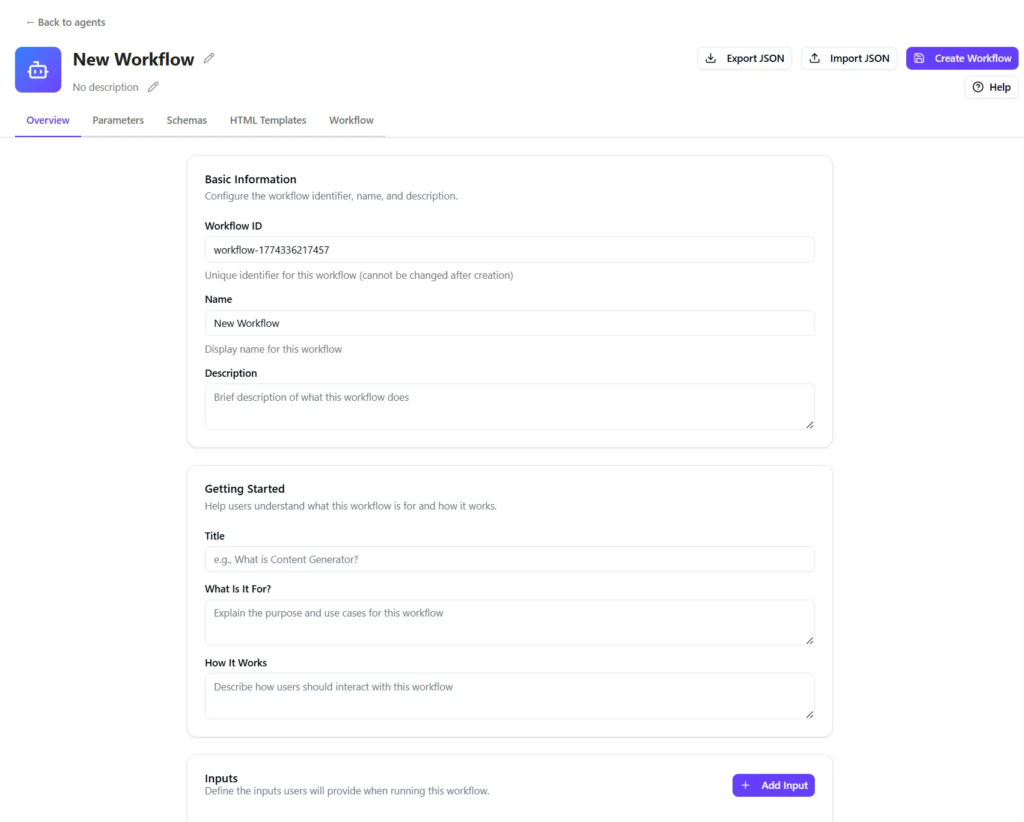
Putting Structured Prompting to Practice in Agentic Studio
Given the above, let’s put this into practice by outlining how to use Agentic Studio with structured prompting via the following scenario of a product page for a luxury SUV.
The Scenario
You have a product page for a luxury SUV. You need to generate three versions of the hero banner text based on Sitecore’s xDB Personas: “The Safety-First Parent,” “The Tech Enthusiast,” and “The Weekend Adventurer.”
How the Structure Works
- The Prompt: Instructs the AI to analyze the core product features and rewrite them to highlight safety, technology, or performance depending on the target persona.
- The JSON Constraint: Forces the AI to return an object containing exactly three keys:
headline,body_copy, andcta.
Because the output is strictly structured in JSON, Sitecore can automatically inject these variations into the correct Experience Editor fields without a human needing to copy-paste or reformat the text.
Choosing Your Agent: Standard vs. Workflow
For our luxury SUV personalization example, we must choose the right tool for the job.
- Standard Agent: Best for “one-and-done” tasks, such as generating a single SEO description for a page or summarizing a short block of text. (Create a standard agent | Sitecore Documentation)
- Workflow Agent: This is the appropriate choice for our luxury SUV personalization task. Personalization requires a multi-step chain of logic: analyzing vehicle specs, identifying persona triggers (e.g., “The Safety-First Parent”), and generating a final creative output. (Create a workflow agent | Sitecore Documentation)
In essence, a Workflow Agent allows you to orchestrate these steps in a sequence, ensuring the output of the “Analysis” step perfectly informs the “Creative” step.
Step-by-Step Configuration in Agentic Studio
Following the tabs in the SitecoreAI documentation (Overview of agent configuration tabs | Sitecore Documentation), here is some guidance on how to build the “Luxury SUV Personalizer” using structured prompting. Please note that this is only a “rough in” to get you familiar with the options in Agentic Studio as it relates to structured prompting and JSON constraints.
1. Overview Tab
Define the user-facing entry point.
- Name: Luxury SUV Copy Personalizer.
- Required Inputs: Configure a File Upload for the vehicle’s technical PDF and a Text Input for the user to provide a specific campaign brief.
2. Parameters Tab
Set the JSON Constraints that guide the generation.
- Category: Target Audience.
- Options: Create options like “Safety-First Parent” and “The Weekend Adventurer.”
- Guidelines: For the “Parent” option, define guidelines like “Focus on ISOFIX, 5-star crash ratings, and cargo space.”
- Link Schema: Attach your “SUV_Input_Schema” to ensure these selections are passed as valid JSON to the model.
3. Schemas Tab
Define the Scope of the result.
- JSON Schema: Create a schema named
SUV_Output_Schema. - Properties:
{ "type": "object","properties": {"headline": { "type": "string" },"body_copy": { "type": "string" },"cta": { "type": "string" } },"required": ["headline", "body_copy", "cta"]} - Goal: This forces the AI to output only these fields, preventing unwanted text.
4. HTML Templates Tab
Determine how the result is presented.
- Template: Create a layout using Handlebars:
<div class="personalization-preview"><h1>{{headline}}</h1><p>{{body_copy}}</p><button>{{cta}}</button></div>
5. Workflow Tab
Connect the logic on the Canvas.
- Add Step: Choose a “Generate Text” action.
- System Prompt: This is your Structured Prompt. “Using the technical specs from the Overview and the Persona guidelines from the Parameters, generate copy according to the SUV_Output_Schema.”
- Properties Pane: Link the
SUV_Output_Schemahere. This ensures the action actually produces the structured JSON required by the next step.
Conclusion
By mastering this combination of structured behavioral guidance and rigid architectural constraints, developers can move past the “magic” of AI and start building genuine, reliable utility within the Sitecore ecosystem.