
Running a 2nd Redis Container in a Sitecore Docker Environment
Following Sitecore’s guidance to not use Sitecore’s Redis instance for custom objects, rather leave that to session management, you may still require Redis for storing custom objects via serialization/deserialization to and from Redis. This could be for custom eCommerce solutions where complex data needs to be carried across pages or any other custom object storage needs.
The following provides a step by step for setting up a 2nd Redis Container in your Sitecore Docker environment, which is critical for development and testing… as many organizations use Docker for local Sitecore development, and if you don’t already, you may want to consider using Docker for your local Sitecore development.
Environmental Variables/.env File
As the Docker files will read the .env file, it’s imperative to add the 2nd Redis variables. I am naming the 2nd Redis “redis-shared” for the purposes of this example and have the following variables in my .env file:
| Variable | Description |
| REDIS_SHARED_PORT=6379 | Sets the Redis Shared Port to 6379, which is a different port than the default Redis Port used of 6380 |
Docker Compose and Docker Compose Override
Within the Docker Compose and Docker Compose Override files; I am setting the image pathing and structure for the 2nd Redis as follows. It is nearly identical to the primary Redis used for session state except for the Port values. This is intentional, as we want to run the same version of Redis within our solution.
Please note the other variables passed in below are also from the .env file but not listed in the 2nd Redis specific list above except for the REDIS_SHARED_PORT variable as these are used across images/containers.
Docker Compose File 2nd Redis Addition
As a child of the services structure, add the 2nd Redis (aka, redis-shared) as follows. Note that I have left the default Redis below as an example:
  redis:
    isolation: ${ISOLATION}
    image: ${SITECORE_DOCKER_REGISTRY}redis:3.2.100-${EXTERNAL_IMAGE_TAG_SUFFIX}
  redis-shared:
    isolation: ${ISOLATION}
    image: ${SITECORE_DOCKER_REGISTRY}redis:3.2.100-${EXTERNAL_IMAGE_TAG_SUFFIX}
    ports:
      - "${REDIS_SHARED_PORT}:6379"
Docker Compose Override 2nd Redis Addition
I am using a Docker Compose Override file to manage my environment specific configurations. To that end, I have the following per the 2nd Redis addition. These are also nested under the services structure.
Take special note of the build: context as this is the path where we house the redis-shared build/Dockerfile information… as well as the args: BASE_IMAGE variable used by the redis-shared Dockerfile in the next step:
  redis:
    image: ${REGISTRY}${COMPOSE_PROJECT_NAME}-redis:${VERSION:-latest}
    build:
      context: ./docker/build/redis
      args:
        BASE_IMAGE: ${SITECORE_DOCKER_REGISTRY}redis:3.2.100-${EXTERNAL_IMAGE_TAG_SUFFIX}

  redis-shared:
    image: ${REGISTRY}${COMPOSE_PROJECT_NAME}-redis-shared:${VERSION:-latest}
    build:
      context: ./docker/build/redis-shared
      args:
        BASE_IMAGE: ${SITECORE_DOCKER_REGISTRY}redis:3.2.100-${EXTERNAL_IMAGE_TAG_SUFFIX}
Docker Build File
Noting the path above in the Docker Compose Override file for the redis-shared entry, create a directory named redis-shared within your docker/build path (if that is the location where you are placing your build information). In my example, I have a single “Dockerfile” within the redis-shared directory as follows:
# escape=`

ARG BASE_IMAGE

FROM ${BASE_IMAGE}
ConnectionStrings
After configuring the basic .env information for the 2nd Redis Port (make sure it’s different than the default Redis Port), setting up your Docker Compose and Docker Compose Override files, and your Docker Build file… it’s time to actually use your 2nd Redis Container!
In my use case, there is a transform within my Docker > Build > CD > Transforms > App_Config directory named ConnectionStrings.Config.xdt. This applies the transform on CD Container build to include the connection string to my 2nd Redis Container. From there, I can access the 2nd Redis via my solution code as needed.
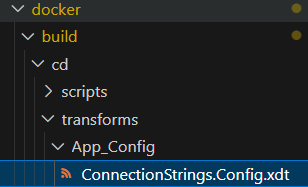
The contents of this file are as follows, being careful to notate the name of my connection:
<?xml version="1.0"?>
<connectionStrings xmlns:xdt="http://schemas.microsoft.com/XML-Document-Transform">
	<add name="redis.shared.storage" connectionString="redis-shared:6379,ssl=False,abortConnect=False" xdt:Transform="InsertIfMissing" xdt:Locator="Match(name)" />
</connectionStrings>
Conclusion
With the steps above, you should be able to add a 2nd Redis Container to your local Docker environment, but it really applies to any custom container you would like to add, so don’t be afraid to play with your options as you might have third party tools that require containers or even separate database tooling.
The core aspect to keep in mind is declaring your environmental variables, images that compose will execute inclusive of any args and path for building, and your build files with any applicable ConnectionString transforms.